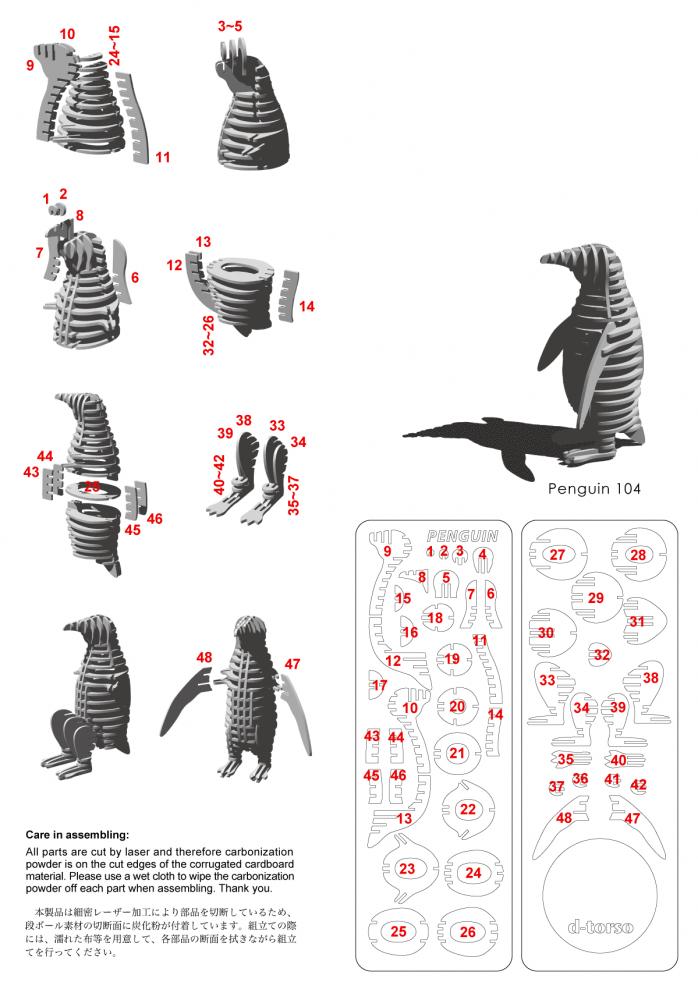
This project is particularly useful as an assembly-reference entry. The supplied JPG combines numbered part layouts, several intermediate build views and a finished penguin model. Red labels connect pieces in the flat layout to locations in the assembled body. The bird is constructed from interlocking profiles and stacked cross-sections rather than a solid sculpted shape. The single DXF supplies the associated design geometry; the JPG is a visual guide, not merely a promotional picture.
This free library entry is identified as DOC-000056. Use the real project preview to choose the design, then inspect the source vectors before committing material. Preview colors, room mock-ups and photographed builds may differ from the lines and pieces in the cutting files.
What is in the project folder?
The extracted folder contains 1 design file: 1 DXF. It also includes 1 preview image. The universal library disclaimer, where present, is not a design or an assembly manual.
These are the formats actually present in this folder—not a promise that every format works in every laser or graphics program. Open a file in your own software and inspect its units, scale, layers and cut-versus-engrave paths before production.
Prepare this design carefully
Start by comparing the part numbering in the reference with the imported DXF. Do not assume that all labels survive the CAD import. Keep a copy of the JPG beside the working drawing so small head, body, wing and foot pieces can be traced back to the diagram. The reference groups some parts by number ranges; use those groupings to study the assembly order without treating them as a verified production checklist.
Make a small test with your own material and machine settings. The library has not independently verified thickness, kerf, strength, electrical performance, load capacity or machine compatibility for this project. If the design includes text, tiny bridges or interlocking parts, examine them at the final intended size.
Before final production, save an untouched source copy, inspect imported geometry for missing curves, and compare the first test piece with the supplied reference image.
How to read the supplied assembly reference
The JPG includes a care note describing removal of cutting residue from corrugated cardboard parts. That note records the source context, not a recommendation that every laser or material should use the same process. It does not verify thickness, settings, scale or safety. Retain original instructions and credits, make your own joint test, and review the image at full size before assembly. No project-specific PDF or video is included, and the universal DISCLAIMER.pdf is not an assembly manual.
Exact source file inventory
DISCLAIMER.pdf— 36161 bytespinguino__DOC-000056-A00001.dxf— 275158 bytespinguino__DOC-000056-A00001.jpg— 88793 bytes
Rights and credits
Keep original creator credits and watermarks. The site owner has attested permission to share these files and images; this is not a grant of public-domain status, digital resale rights or unrestricted downstream commercial use. Read the rights guidance and download guide. Questions: support@openlaserfiles.com.
Where to find the files
Open the shared PikPak library, enter the category folder, then search for the exact project folder below. This link opens the shared library, not a direct ZIP download; an account may be required. Browse more designs in the same category.
If PikPak attributes a paid upgrade to this referral link, the site may receive a commission. See the affiliate disclosure.
Project ID: DOC-000056
Exact folder path: 16_Documentation_and_Media/DOC-000056_10000_Vectores_de_Corte_Laser_part_05_1500_Disenos